How To Submit Blogger Sitemap to Yandex Guide for Bloggers


 It is critical to submit a sitemap to search engines in order to obtain rankings and organic traffic. There are several search engine websites, but Yandex is one of the largest and most popular in Russian. So, in this article, we'll show you how to submit a Blogger sitemap to Yandex.


It's very simple to add a sitemap to Yandex. In just a few minutes, you can verify and add your blog's sitemap. If you want to increase your site's traffic from various search engines, you should include a sitemap, which aids the crawler in better indexing your site.


What exactly is Yandex?

Yandex, by the way, means for "Yet another Indexer," or, to put it another way, "Yandex" is a Rassian "Google." When we think of Google, we automatically think of a search engine, but that isn't entirely accurate. Google is much more than that, and it is far more exceptional than what we are familiar with. Similarly to Google, Yandex is far more than a search engine.


Yandex is a multinational technology company that offers a variety of digital services, including a search engine, maps, email, and more. In 1997, Arkady Volozh, Arkady Borkovsky, and Ilya Segalovich founded Yandex.


Yandex currently offers over 70 internet-related products and services, including mobile apps, e-commerce, transportation, online advertising, and search and information services.


Sitemap submission to Yandex
To submit the blogger sitemap to Yandex, you must first register an account. So, first and foremost, you must register a Yandex account.


After you've made your account, you'll need to log in. Add your blog address to Yandex Webmaster Tools by clicking the Plus symbol.


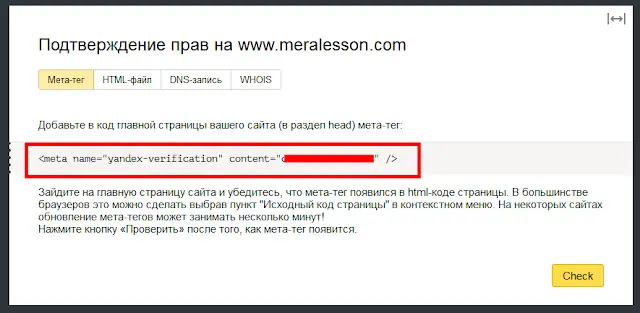
You must validate your blog after submitting your blog address, thus you will see methods to verify your website. You must duplicate the meta code for the blogger blog, therefore copy the meta verify code.


You must now navigate to Blogger >> Template >> Customize. Save your template after editing HTML and pasting the code below the head tag.


Now you must verify your blog and submit your blogger sitemap to Yandex by going to Indexing Settings >> Sitemap files and submitting your blog sitemap.

http://www.YourBlogAddress.com/sitemap.xml

That's it; it'll take up to three days to begin indexing your content. If you like this video, then like and follow us on Instagram and Facebook to stay up to date.

Rate This Article

Thanks for reading: How To Submit Blogger Sitemap to Yandex Guide for Bloggers, Sorry, my English is bad:)

Getting Info...

About the Author

Matthew West is an Internet Marketer, Content Writer, Virtual Assistant, Crypto Enthusiast, YouTuber ,Blogger who's on a journey of Making Money Online. He loves to Research and shares his Knowledge / Experiences for the benefit of all!

Post a Comment

Cookie Consent
We serve cookies on this site to analyze traffic, remember your preferences, and optimize your experience.
Oops!
It seems there is something wrong with your internet connection. Please connect to the internet and start browsing again.
AdBlock Detected!
We have detected that you are using adblocking plugin in your browser.
The revenue we earn by the advertisements is used to manage this website, we request you to whitelist our website in your adblocking plugin.
Site is Blocked
Sorry! This site is not available in your country.