
Blogger posts can now include a responsive table. As you may be aware, Google's Blogger is a free blogging platform that anybody can use to share their expertise and opinions with the rest of the world. Blogger has become very popular in recent years due to its user-friendly interface and ease of use. If you are new to blogging, you should try this platform where you can share your knowledge with others while also earning money.

When you publish an article in Blogger and want to include a table, there is no tool available to do so. However, you can make a table and categorize your material using HTML coding. However, if you don't know how to code, how can you add an exciting and colorful table to your blogger post?
I'm going to show you how to insert a table into a blogger post.
If you're new to HTML coding, you've come to the right place. Here you'll learn how to add a table to a blogger post without using any code. This is the simplest way to add a responsive and attractive table to a blogger post. You only need a basic understanding of computers to complete this task.
All you have to do now is follow the steps below.
First and foremost, you must have Microsoft Office installed (Microsoft Word). On your PC, open Microsoft Word. You must construct a table in Microsoft Word according to your needs (for example, if you require a table with two columns and five rows) and write your material in the table.
You can alter the appearance of your table.

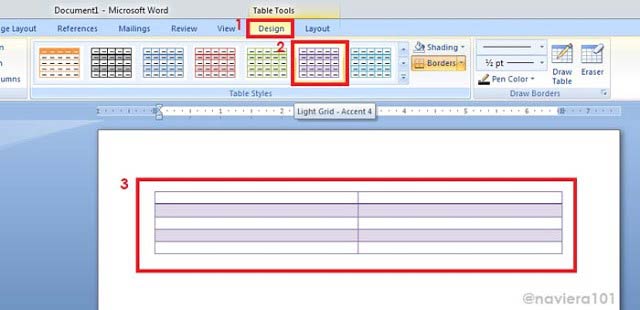
Step 2: Now you must duplicate your table. First, select your table by pressing Ctrl+A, then copy it by pressing Ctrl+C or right-clicking the mouse and selecting the copy option. Your table will now be chosen.

Step 3: Log in to your Blogger account, go to the dashboard, and create a new post, where you may write your article and paste your copied table. You have seen a preview of your article before publishing it so that you can see how it looks. If everything seems good, click the Publish button.

I hope this Article was helpful to you?
Kindly share it on your social media platforms for others to get access to it.
Rate This Article
Thanks for reading: How to add table in blogger post? | Easiest way to add responsive table to blogger post , Sorry, my English is bad:)